10_10

Challenge #2 PUMPKINS

Good morning everyone,
Today is our Design Team’s second challenge! We are so excited about today’s theme. The designer’s worked hard on their projects and it shows!
Today’s Challenge-theme
Pumpkin PatchShare your projects that have your favorite “pumpkin” on it!
Real Easy! Let’s Take A Look At What the Design Team “Cooked Up” for you.

Brandilynn

Created By Brandilynn 

Brandilynn used the Bear Carving Pumpkin Cutting file from Page-Kits.com


brandilynn 10-20

BeanieBeanie’s Tag Your It Blog
Beanie used the Bear In Pumpkin Patch cutting file fromPage-Kits.com
beanie happyfall pg2
beanie happyfall pg1


Michelle
Mum of Two
Michelle used her Cricut and Mini Monsters Cricut Cartridge.
michelle

Christel

Scrappin’ Sista
Used the Bear In Pumpkin Patch Digital Stamp fromPage-Kits.com

Christelpumpkinpatch102010


Cyndi
Cyndi’s Treasures
Used the Bear In Pumpkin Patch cutting files fromPage-Kits.comcyndi b

Gaby
Gaby Creates
Gaby used the Kitty Carving Pumpkin cutting file from
Page-Kits.com
gaby


Abby
Scrapbookaholic By Abby
Abby used the Girl on Pumpkin cutting file from
Page-Kits.com
abby layout


Adrea
From The Hills
Adrea used the Pumpkin Man cutting file from
Page-Kits.com
adrea


Valine
Maddster Creations
Valine used the Bear in Pumpkin Patch cutting file from
Page-Kits.com
unknown

Jenna
Jenna’s Favorite Things
Jenna used the Pumpkin Patch cutting file from
Page-Kits.com
jenna


Madison
Funky Cards
Madison used her Cricut and Create-A-Critter, Zooballoo and more.
madison-cac-zoo-

Kristal
Getting Cricky with KAndrew
Kristal used her Cricut.
fallchallengecwckandrew


Kassidy
Inking It Up Crazy
Kassidy u
sed her Cricut.


Now show us your PUMPKINS! Just link your project through Inlinkz at the bottom of this post and share the fun! You have until midnight, Tuesday, October 26th to enter.

PLEASE BE SURE TO VISIT OUR DT MEMBER'S BLOGS AND SHOW THEM A LITTLE LOVE FOR ALL THEIR HARD WORK!One winner will receive these Digital Stamps or Cutting Files (winner’s choice) From
PaperCraftingWorld.com


BC Awareness Post FREE File

WOW!!!!! Check out today's project! Abby from our DT put this dynamite layout together!
I was SO EXCITED to see this! It is such an honor to have all these ladies putting their design talents out there for us to share!

Here is a view of her entire layout.


Closeup of the left page.


Closeup of the right page.

Can you see all the bling on this cutie? She has her awareness ribbon and sneakers bejeweled!! I love the creativity!!!


Here is a layout with the instructions

The bear on Abby's project is available as a cutting file and
as a digital stamp over at Page-Kits.com.

Thank you Abby for such a fabulous way to encourage our sisters, mothers, aunts and friends, etc. to FIGHT LIKE A GIRL! Please be sure to hop over to Abby's blog and send her a little love for all her hard work :-) SCRAPBOOKAHOLICBYABBY.COMIn honor of Abby's hard work, you have 2 chances to win
the cute little awareness bear cutting file.

Walking For The Cure-Awareness Bear Cutting File. Available in the following formats: AI, DXF, GSD, KNK, MTC, SVG, SCUT(scal 2.0), WPC and WPC14.
  1. Be sure to be a follower of THIS blog and leave a comment on THIS POST.
  2. Hop over to Abby's blog and leave a comment on her post: HERE
We will pick the winners next week Wednesday and announce them next Friday along with the winner from this week's challenge!

Also: Here is an awareness ribbon FREE CUTTING FILE! It will be available for only 24 hours...so grab it while you can! CLICK HERE TO DOWNLOAD

Thank you so much for stopping by! Please plan to come back tomorrow as we reveal our second challenge!!!!

Happy Sweetest Day! - FREE Cutting & Digi Files

Good morning everyone!
Happy Sweetest Day!

I am so glad to be back to some regular posting....let's say a prayer and keep our fingers crossed that my computer will continue to co-operate :-)

In honor of Sweetest Day, I wanted to thank all of you for your faithful support of this blog. Especially the new Design Team Members!

They have worked really hard to begin to bring you some fun challenges. PLEASE, PLEASE, PLEASE...Go to this week's challenge and leave a comment for them AND.....PARTICIPATE...It is an easy, peasy challenge :-) If you leave them a comment, you could win two cutting files or digital stamps from Page-Kits.com.

But to sweeten the pot....If you leave a comment on the challenge post from this week HERE, AND one on this post....one lucky commenter will win this adorable cut file or digi stamp (winner's choice) that I just created....This cute little bear with a box of chocolates :-) Just asking three things:
  1. Be sure to be a follower of this blog
  2. leave a comment on this post AND
  3. Leave a comment on the CHALLENGE POST: HERE.....
That's it. That's all I ask. Let the girls know you've seen and appreciate their wonderful work :-)

Okay, so now on to today's projects and FREE cutting file and digi stamp.

Here is a layout I made a couple of years ago. It was pretty clean and straightforward. I used some Basic Grey patterned paper that was so pretty.

The BG paper inspired me to create this wonderful rose piecing. Here is a closeup of th rose. I cut all the pieces of the rose (except the leaves) out of white cardstock. I then inked and chalked the "inner" pieces. I left the background part completely white. I then assembled the rose and used some Stickles to "Outline" the rose.

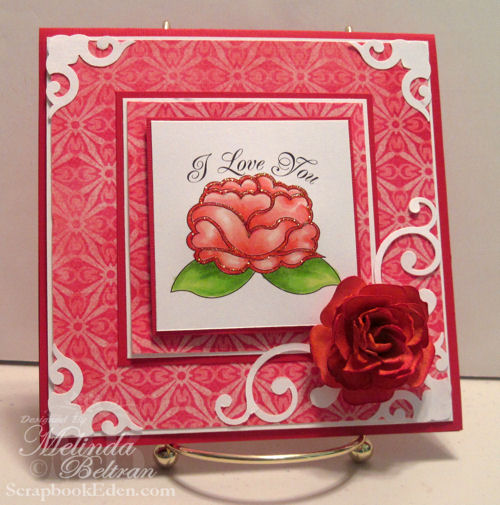
Now here is the same rose, converted into a Digital Stamp.
I used my Copic markers to color the stamp in and then used some Stickles to Outline it. I used a couple of EK punches for the corners and flourishes and I used my Cricut for the dimensional flower. If you would like to know more about the dimensional flower, just go to yesterday's Fantabulous Friday post and get the info....you can go HERE

The digital stamp set comes in pdf with four different sentiments. It also has the plain rose (no sentiment) in jpg format. The cutting file comes in the following formats: AI, DXF, GSD, MTC, KNK, SVG, SCUT(scal 2.0), WPC and WPC 14.
If you would like the FREE Digital Stamp set: CLICK HERE
If you would like the FREE Cutting File: CLICK HERE
Be sure to grab them quickly as they will only be available for FREE until Sunday night (tomorrow, Oct. 17th) at midnight (eastern) time.

50 States Flower Review

Good morning everyone!
Today I am "Exploring" a cartridge...this weeks lucky cartridge is.... Mr. Classmate himself....50 States
Yes, this studious little cartridge has been around for quite some time. I must admit, if he had been released this year with all the other TONS of Cartridges, he probably would have been "kicked to the curb". He was definitely marketed to the education community. And the packaging made it a little hard to think beyond the 50 states shapes, flags and the educational needs he would meet.

BUT...if you look beyond all that, he has some little gems stored within the "prongs" of his case.

Today I am not focusing on anything but the FLOWERS! Yep that's right....the FLOWERS. So here are a few...not 50, just a few flowers I was able to come up with by working with this little fellow.


The Yellow Flower

This is the "Kansas" Flower on Page 28.I cut him in 4 different layers and at 4 different sizes. I then cut "slits" to make the individual petals. I then "Fluffed" the petals up to give it the dimension.This flower looks a bit like a Carnation or it could be a sunflower.

Check out the tutorial on this flower HERE


The Pink Flower

This is the "North Dakota" flower on page 46. I cut this flower in 4 layers in 3 different sizes. I cut "slits" so the petals would be a little more loose. To me this one looks like a rose.
Check out the tutorial on this flower HERE.


The Purple Rolled Flower

This is the "Ohio" flower on page 47. After cutting this flower out, I cut a slit to "open" up the flower. I then glimmer misted it and rolled it. These are much like all the other "rolled" or "lollipop" flowers that have been floating around the net most of this summer....Who knew...they were tucked away all this time in our little cartridge :-)
Check out the tutorial on this flower HERE.

The Red Flower
This is the "IOWA" flower on page 27 and the center set is the "North Dakota" one. For this one I did use my Gypsy to "hide" the center cutout. But I think you could still achieve this look without doing that. I did, once again, cut the petals "loose" so they would have more play. After glimmer misting, I waited until it was just about dry to "shape and sculpt" the petals. This is just a matter of sitting down and playing with the petals until they look the way you want them to. Crazy thing is: once the glimmer mist is completely dry, the paper gets pretty hard and so these flowers keep their shape really well.


The Orange Flower

This is the "Maryland" flower found on page 32. I cut out the flower option that had two cut at the same time, one with a circle cut out and one without. I then once again cut "slits" so the petals would be loose. I then staggered the layers starting with one that had a hole so that the top layer would be a solid. I then curled the petals just before they were dry.


The Teal Flower

This last beauty is the "North Carolina" flower found on page 45. For this one, I simply cut 3 flowers two at 6" and one at 5". I then glimmer misted and then layered them by "mirroring" them. I then "shaped" the flowers just before the petals were dry to give it dimension. I finally layered the 3 centers and "fluffed" them and added a touch of sparkle to it.

Yep...that's right, all these beauties were created with the 50 States Cartridge. I don't have them on any projects yet, but they are now a part of my flower stash and ready to go at a moments notice :-)

BONUS PROJECT
Here is a card I made last year. I used the same techniques for this flower as I did for the others. With this one though, I did three different colors of glimmer mist to give the flower petals a more varigated look.
Here is a closeup of the flower.

If you would like the flower cutting file below: Please sign up for my newsletter and become a follower and I will be sending the link out in Sunday's newsletter. PLUS another flower too :-) The newsletter will go out Sunday evening. It will be available in the following formats: AI, DXF, GSD, KNK, MTC, SVG, SCUT(Scal 2.0), WPC and WPC14.

AND LAST.... A FREEBIE FLOWER I WHIPPED UP :-)
You can download the zip file: 
The zip file contains the following format: AI, DXF, GSD, SVG, SCUT(scal 2.0), MTC, KNK, WPC and WPC14. Remember to snag it while you can....it will only be available FREE until Sunday at midnight :-)

Thank you for joining me today! I hope you were inspired to make a whole bunch of "pretties"
-Melin

fnl2g101112

Free Newsletter Subscriber Only Digital Stamp
Free for approximately One Week.
No longer available.
Go To PaperCraftingWorld.com for our great, afforadably priced cut files and digital stamps.

Latte Cheer Card

Good morning everyone,
Here is my project this morning for my Pile It On Design Team challenge. Our challenge this week was to use things in 3's.  We were also provided with this cute digital stamp from Fresh Brewed Designs. Be sure to hop over to PIO and FRESH BREWED to see what the other DT members have "brewed" up for your creative inspiration.  Also be sure to join in the fun!
So the things I did in 3's
  • 3 Colors of cardstock
  • 3 Prima Flowers
  • 3 Blue Square Blings
  • 3 Different Colored Stickles (Red, Diamond & Cinnamon).
The challenges my project applies to:
PIO - Things in 3's - Fresh Brewed Design
A Spoon Full of Sugar- Sparkle and Shine
Fab N Funky #43 - Use Digi Image
Pollycraft - Anything Goes
Corrosive - Clean up the Dust (Primas)
For Fun Challenges – Dust Collector (Primas)
Crazy 4 Challenges - Birthday

STAY TUNED! I will be back a little later with my project for this week's FCCB challenge :-)